Windows SBS 2011 password recovery software and guide
I forgot administrator password to Windows Small Business Server (SBS) 2011 Standard. I need help to recover my administrator password for my SBS 2011 server and get into my server. Does somebody tell me which software i can use to fix my problem quickly?
Here, I shows how to use Spower software to reset Windows SBS 2011 password when forgot it. Steps as follow:
Step 1: Download Windows SBS 2011 password recovery software and install it.
Download Windows SBS 2011 password recovery software (Trial Version)
Step 2: Create a Windows SBS password recovery disk with Spower software. Insert cd/dvd/usb disk, and click burn button to burn password program to the disk.
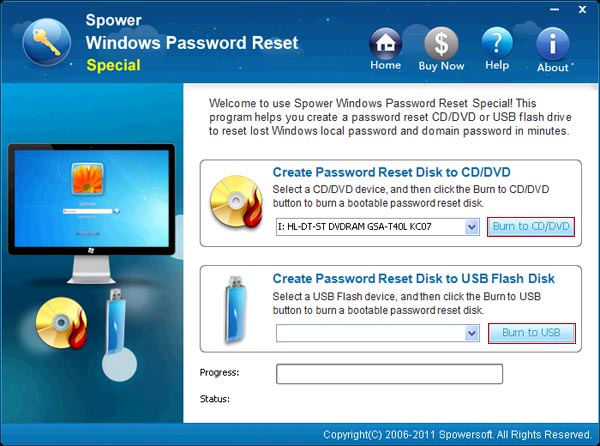
Step 3: Set your SBS computer to boot from USB drive or CD/DVD drive. Tips: If you know your sbs computer’s boot menu key, you can use it boot your SBS computer from password recovery disk directly without accessing to BIOS and changing BIOS setting.
Step 4: Boot your SBS computer from Windows SBS password recovery disk.
Step 5: When the follow screen appears, select a windows user, and click “Reset” button to set a new password for it. Also, you can use this software to “Add new user” to your Windows SBS offline.
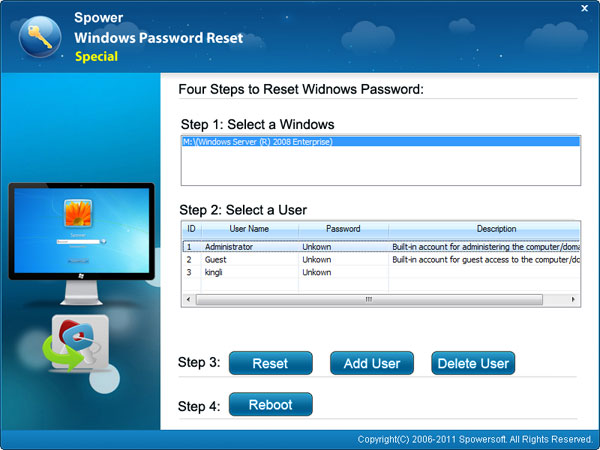
Step 6: Restart SBS server computer and login with new password.
Related Articles:
- reset administrator password Windows Server 2008 r2
- Forgot password windows server 2008 r2
- Windows Server 2003 administrator password recovery
- Windows Server 2008 r2 administrator password recovery