How to unlock my computer if i forgot the password
How to unlock my computer if i forgot the password? A a computer user, have you ever come across this issue? Don’t worry. It is easy to unlock a locked computer with the ways described in this article.
Method 1: Unlock computer password with Spower password software.
1. Download password unlock software from Spowersoft official site, and install it to a accessible computer.
- Download password unlock software for Windows xp/viata/7/8
- Download password unlock software for Windows server 2000/2003/2008/2012
2. Create a password unlock disk with Spower software. Insert USB or CD/DVD disk, and then follow the tips to create a password unlock disk.
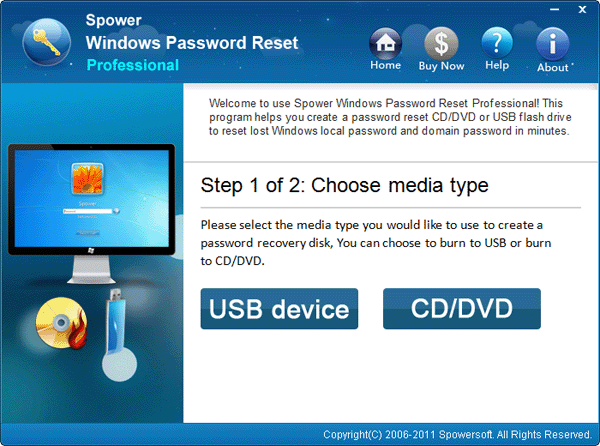
3. Boot the locked computer from password unlock disk. Remember to access BIOS and set the locked computer to boot from USB or CD/DVD drive before doing this step.
4. When the password unlock disk is booted successfully, you can see the following screenshot, and you can follow the steps (1,2,3,4) below to set a new password to your computer without current password.
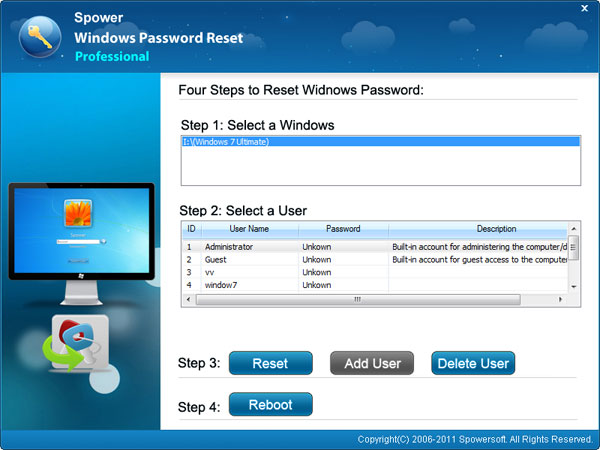
Method 2: Unlock forgotten computer password via windows 7/vista/xp password reset disk.
A windows password reset disk can help you unlock your computer password within few clicks, so if you have one, you can follow the guide in this page: http://windows.microsoft.com/en-US/windows-vista/Reset-your-Windows-password to reset new password to the locked user.
Related Articles:
- How to unlock windows 7 password
- I forgot my computer password what to do?
- I forgot my windows 7 password what do i do?