Asus laptop forgot password how to reset
Forgot Asus laptop password and you are locked out? Don’t upset. This post shows how to reset a forgotten password for windows 8/7/xp on Asus laptop.
Here only shows you a fast way to recover your lost password on Asus laptop with Spower software. In fact, there are many solutions can help you get in your computer if forget password. If your want more solutions, you can refer to I forgot my laptop password windows 7 that to do?
Step to recover Asus laptop password:
1. Download Spower Windows Password Reset Tool and install it to a accessible Windows computer.
2. Insert USB or CD disk to computer.
3. Start Spower Windows Password Reset tool, and user it to create a password reset disk.
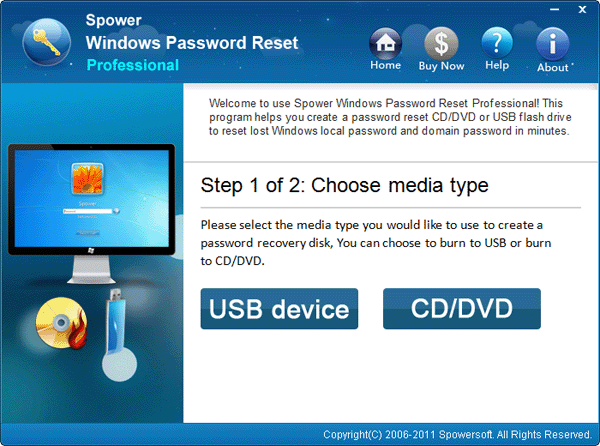
4. Take out the password reset disk and insert it to the Asus laptop.
5. Start or restart Asus laptop. When Asus logo appears, press ESC key to enter BOOT Options Menu, and then choose USB or CD disk to boot from. Tips: If fail to get in boot option menu, you can try more.
6. When Spower password software starts, choose a user account, and click “Reset” to set a new password for that locked user.
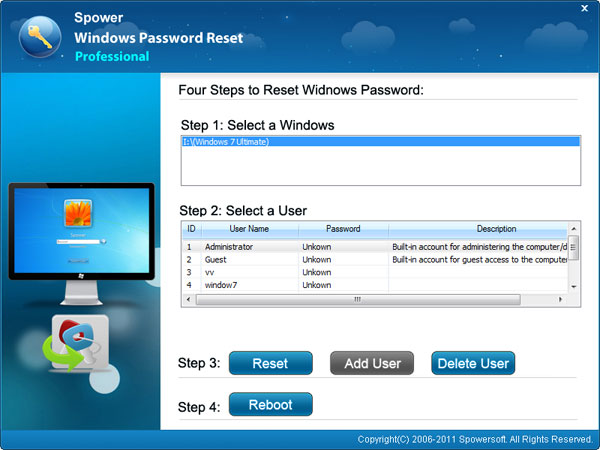
7. Click Reboot to reboot Asus laptop and login with new password.
- Related Articles:
- Acer laptop password recovery
- Forgot HP laptop password
- Locked out of windows 7 forgot password?
- Locked out of laptop forgot password | How do i unlock my laptop