Locked out of windows 7 forgot password?
“I locked out of Windows 7 forgot password, and now i cannot get in to my Windows 7. I need to get in to my windows and replay email to my customer immediately. I have try to use many password software recover my windows 7 administrator password, but none of them works. All of them cannot detect my Windows system. My computer is HP Compaq Presario.” – Question from yahoo.com.
If we are locked out of Windows 7, what do i do to unlock my computer? You can try the solutions below:
1. Check whether you can access computer with another administrator account.
If you still have another user account which has administrator privilege and you can login your computer with it, you can follow the instructions below to reset a new password for the locked user:
1.1 Login the locked computer with the workable user.
1.2 Start ->In search box, type in: cmd.exe, right click CMD.exe, then choose “Run as administrator”.
1.3 In command prompt, type in: Net user <user name> <new password>, and then press Enter to execute the command. If get the message “The command completed successfully”, the user has been set a new password successfully.
2. Check Whether you can unlock the locked computer with windows 7 password reset disk.
If you have created a password reset disk before you forgot the login password and locked out of Windows 7, you can use it to unlock your computer instantly. Step as below:
2.1 Start your windows 7 to the log on screen.
2.2 Attempt to login with a wrong password, and you will get the message “The user name or password is incorrect”. Close that message, and then click “Reset Password…”, a password unlock wizard starts.
2.3 When password unlock wizard starts, insert USB password unlock disk to computer, and follow the wizard to reset a new password to the locked user step by step.
Reference: What to do if you forget your Windows password
3. Recover the locked windows 7 computer with password software.
If the methods above do not work for you, I recommend you use third party password software to recover the lost password, which can save on your time and keep your data safe. If you have no idea which software is right for you, I recommend you Spower Windows Password Reset which can help you recover windows 8/7/vista/xp/2000/2003/2008/2012 quickly and easily.
>> Download Spower Windows Password Reset trial version
Guide to unlock windows 7 password with Spower software:
1. Download and install Spower software to a accessible computer.
2. Start Spower software, insert USB/CD/DVD disk, and then click “Begin Burning” to create a windows 7 unlock disk.
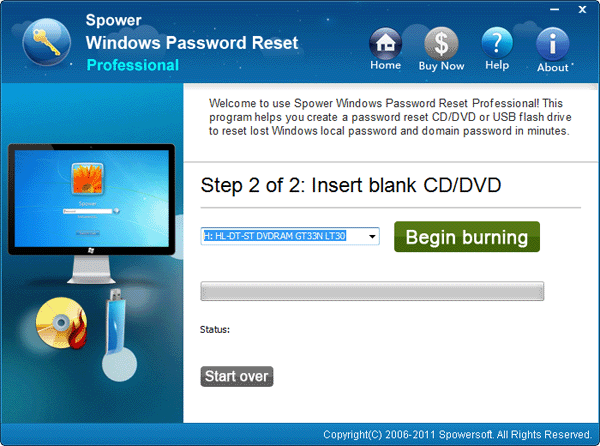
locked out of computer forgot password windows 7
3. Set the locked computer to boot from USB flash drive or CD/DVD device.
4. Insert windows 7 unlock disk to the locked computer, and reboot the locked computer.
5. When Spower software runs, choose the locked user which you have forgotten password for, and click “Reset” to set a new password to it.
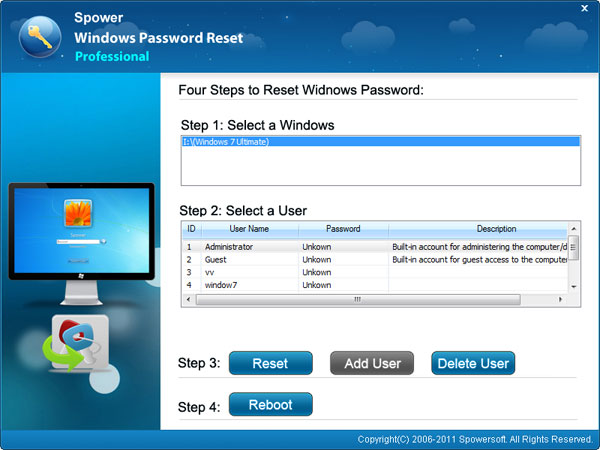
locked out of my computer forgot password windows 7
6. Reboot computer and login with new password.
Tags: Locked out of windows 7 forgot password, Locked out of windows
Related topics:
Locked out of laptop forgot password | How do i unlock my laptop
How to unlock Windows 8 Password if lost it
How to unlock Windows 7 password
Questions about locked out of computer
1. locked out of administrator account windows 7, do these ways work?
– Yes. If the method 1 and method 2 do not work for you, you can use the software mentions in methods to create a password password unlock disk to recover the forgotten password in a few minutes.
locked out of computer forgot password, need your help.
I have a HP laptop and i forgot its password, i had use spower password software to create a disk, but i could get my computer to boot from that disk. Can you tell me how to set my hp laptop to boot from the usb flash disk?
Thanks.
Hello, Nick.
Two ways to set your laptop to boot from USB flash disk:
1. Use boot menu, refer to: How to set your comptuer (laptop) boot from CD/USB drive quickly.
2. Access to bios to set your computer to boot from USB drive. See: How to set computer to boot from USB drive
I forgot password and locked out of windows vista, can method 3 work on Windows vista?
Yes. The software Spower pssword reset works fine on Vista.
Help, please. I locked out of windows xp forgot administrator password. I have no password recovery disk. How can i unlock my windows xp? Can you suggestion?
You can press f8 to login windows xp by safe mode if the administrator use have no password.
Or you can ge the spower password reset software to create a password recovery disk, and use it to recover the lost password.
Very helpful for me. I have created disk on my Mac and reset my Windows 7 password on my HP laptop.
Awesome article.