2 Ways to Create a Password 10 reset disk on another computer
Forgot windows 10 password and locked out of windows 10? Here shows you 2 way to create a Windows 10 password reset disk on another Windows computer or Mac computer.
- Create a Windows setup disk on another computer.
- Create a password reset disk on another Windows computer or Mac computer.
1. Create a Windows setup disk on another computer
If you forgot windows 10 password on laptop, I strongly recommend you follow this guide to create a Windows setup disk to reset the forgotten password. It’s easy for everyone. Just follow me to do it.
Step 1: Download Windows 10 Media Creation tool, run it and follow the step by step wizard to create a Windows 10 installation disk. Tips: You need a empty USB flash drive here. More detail about creating a Windows 10 installation disk, see https://www.microsoft.com/en-us/software-download/windows10
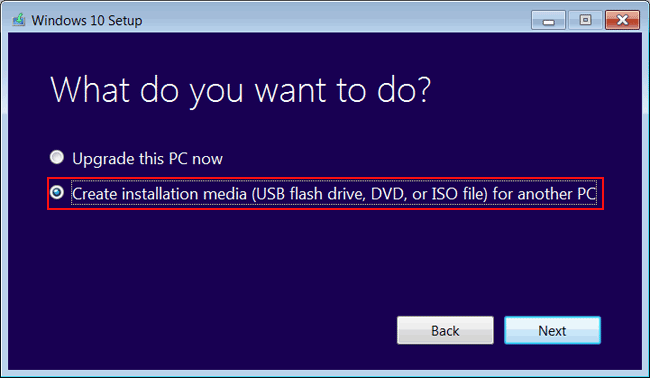
Step 2: Set the locked Windows 10 computer to boot from Windows 10 installation disk. See how to set computer to boot from USB drive.
Step 3: Follow this guide to reset Windows 10 password with installation disk. Reset Windows 10 administrator password with installation iso.
2. Create a password reset disk on another Windows computer or Mac computer
If you have trouble in create a windows 10 setup disk with solution 1, you can get Spower Windows Password Reset and use it to create a Windows 10 password reset disk on another windows computer or Mac computer.
Steps to use Spower software to create a Windows 10 password reset disk on another Windows computer:
Step 1: Ge Spower password reset software full version for trial version and install it on another accessible Windows computer.
Step 2: Insert USB disk, and start Spower password software to create a Spower Password disk.
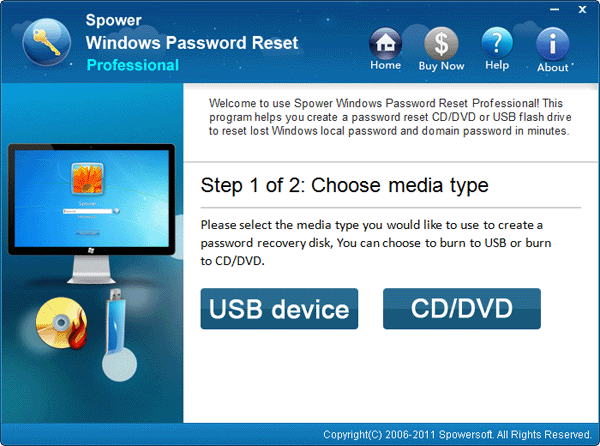
how to create password reset disk on another computer
Step 3, step 4 and step 5 tell your how to how to reset the forgotten password with the password reset disk.
Step 3: Boot the locked Windows 10 computer from the Spower Password disk. See http://www.windowspasswordsreset.com/blog/how-to-set-your-comptuer-laptop-boot-from-cdusb-drive-quickly/
Step 4: When the locked computer boot from Spower Password disk successfully, Spower software will show your Windows and Windows user account. You just need to choose the right windows and right user, and then click “Reset” to reset its password.
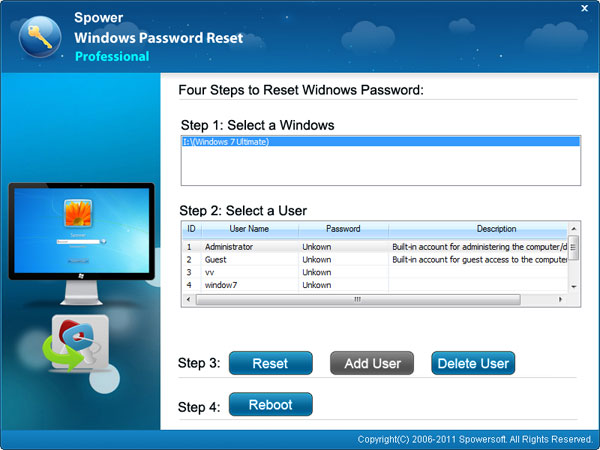
Step 5: “Reboot” computer and login with new password.
Tips: If you want to create a Windows 10 password reset disk on Mac computer, please follow this guide: How to create a windows password reset disk on Mac.
Related Articles:
- How to reset windows 10 password without disk
- Forgot windows 7 password no reset disk, how to do?
- How to create a password reset disk for another computer if it’s locked
Thanks very much. Now I can get into my windows without re-installing system.
– viagra online
Thanks. I have re-installed my system. I will try it next time.
Have problem in creating windows 2008 password reset disk on my MAC book. How to do?
Hello. Can i create a reset disk for my Windows 10 on Mac pro?
Hello! Would you mind if I share your blog with my myspace group?
There’s a lot of people that I think would really appreciate your content.
Please let me know. Many thanks
however, not installed problem coming
Have create a reset disk with my Macbook Air. Yes!!!
Exceptionally well written!
Windows 10 password reset disk has been created.
Good tips. Saved as a favorite.